#include <hikogui/GUI/gui_window.hpp>
Public Types | |
| using | delegate_type = gui_window_delegate |
Public Member Functions | |
| gui_window (gui_system &gui, label const &title, std::weak_ptr< delegate_type > delegate={}) noexcept | |
| gui_window (gui_window const &)=delete | |
| gui_window & | operator= (gui_window const &)=delete |
| gui_window (gui_window &&)=delete | |
| gui_window & | operator= (gui_window &&)=delete |
| virtual void | init () |
| 2 phase constructor. | |
| bool | is_gui_thread () const noexcept |
| Check if the current thread is the same as the gui_system loop. | |
| void | set_device (gfx_device *device) noexcept |
| hi::keyboard_bindings const & | keyboard_bindings () const noexcept |
| Get the keyboard binding. | |
| void | request_redraw (aarectangle redraw_rectangle) noexcept |
| Request a rectangle on the window to be redrawn. | |
| void | request_redraw () noexcept |
| Request a rectangle on the window to be redrawn. | |
| void | request_relayout () noexcept |
| void | request_reconstrain () noexcept |
| void | request_resize () noexcept |
| virtual void | render (utc_nanoseconds displayTimePoint) |
| Update window. | |
| grid_widget & | content () noexcept |
| Get a reference to the window's content widget. | |
| toolbar_widget & | toolbar () noexcept |
| Get a reference to window's toolbar widget. | |
| virtual void | set_cursor (mouse_cursor cursor)=0 |
| Set the mouse cursor icon. | |
| void | set_resize_border_priority (bool left, bool right, bool bottom, bool top) noexcept |
| virtual void | close_window ()=0 |
| Ask the operating system to close this window. | |
| virtual void | set_size_state (gui_window_size state) noexcept=0 |
| Set the size-state of the window. | |
| virtual aarectangle | workspace_rectangle () const noexcept=0 |
| The rectangle of the workspace of the screen where the window is currently located. | |
| virtual aarectangle | fullscreen_rectangle () const noexcept=0 |
| The rectangle of the screen where the window is currently located. | |
| virtual hi::subpixel_orientation | subpixel_orientation () const noexcept=0 |
| gui_window_size | size_state () const noexcept |
| Get the size-state of the window. | |
| virtual void | open_system_menu ()=0 |
| Open the system menu of the window. | |
| virtual void | set_window_size (extent2 extent)=0 |
| Ask the operating system to set the size of this window. | |
| virtual std::string | get_text_from_clipboard () const noexcept=0 |
| Retrieve a text string from the operating system's clip-board. | |
| virtual void | set_text_on_clipboard (std::string str) noexcept=0 |
| Place a text string on the operating system's clip-board. | |
| void | update_mouse_target (hi::widget const *new_target_widget, point2 position={}) noexcept |
| void | update_keyboard_target (hi::widget const *widget, keyboard_focus_group group=keyboard_focus_group::normal) noexcept |
| Change the keyboard focus to the given widget. | |
| void | update_keyboard_target (hi::widget const *widget, keyboard_focus_group group, keyboard_focus_direction direction) noexcept |
| Change the keyboard focus to the previous or next widget from the given widget. | |
| void | update_keyboard_target (keyboard_focus_group group, keyboard_focus_direction direction) noexcept |
| Change the keyboard focus to the given, previous or next widget. | |
| translate2 | window_to_screen () const noexcept |
| translate2 | screen_to_window () const noexcept |
Data Fields | |
| gui_system & | gui |
| std::unique_ptr< gfx_surface > | surface |
| aarectangle | rectangle |
| The current rectangle of the window relative to the screen. | |
| mouse_cursor | current_mouse_cursor = mouse_cursor::None |
| The current cursor. | |
| bool | resizing = false |
| bool | active = false |
| label | title |
| float | dpi = 72.0 |
| hi::theme | theme = {} |
| Theme to use to draw the widgets on this window. | |
| extent2 | widget_size |
| The size of the widget. | |
| std::unique_ptr< window_widget > | widget |
| The widget covering the complete window. | |
| notifier< void()> | closing |
| Notifier used when the window is closing. | |
Friends | |
| class | widget |
Detailed Description
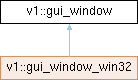
A Window. This Window is backed by a native operating system window with a Vulkan surface. The Window should not have any decorations, which are to be drawn by the GUI, because modern design requires drawing of user interface elements in the border.
Member Function Documentation
◆ close_window()
|
pure virtual |
Ask the operating system to close this window.
Implemented in v1::gui_window_win32.
◆ content()
|
inlinenoexcept |
Get a reference to the window's content widget.
- See also
- grid_widget
- Returns
- A reference to a grid_widget.
◆ fullscreen_rectangle()
|
pure virtualnoexcept |
The rectangle of the screen where the window is currently located.
Implemented in v1::gui_window_win32.
◆ get_text_from_clipboard()
|
pure virtualnoexcept |
Retrieve a text string from the operating system's clip-board.
Implemented in v1::gui_window_win32.
◆ init()
|
virtual |
2 phase constructor.
Must be called directly after the constructor on the same thread, before another thread can send messages to the window.
init() should not take locks on window::mutex.
◆ is_gui_thread()
|
noexcept |
Check if the current thread is the same as the gui_system loop.
◆ keyboard_bindings()
|
noexcept |
Get the keyboard binding.
◆ open_system_menu()
|
pure virtual |
Open the system menu of the window.
On windows 10 this is activated by pressing Alt followed by Spacebar.
Implemented in v1::gui_window_win32.
◆ render()
|
virtual |
Update window.
This will update animations and redraw all widgets managed by this window.
◆ request_redraw() [1/2]
|
inlinenoexcept |
Request a rectangle on the window to be redrawn.
◆ request_redraw() [2/2]
|
inlinenoexcept |
Request a rectangle on the window to be redrawn.
◆ set_cursor()
|
pure virtual |
Set the mouse cursor icon.
Implemented in v1::gui_window_win32.
◆ set_size_state()
|
pure virtualnoexcept |
Set the size-state of the window.
This function is used to change the size of the window to one of the predefined states: normal, minimized, maximized or full-screen.
Implemented in v1::gui_window_win32.
◆ set_text_on_clipboard()
|
pure virtualnoexcept |
Place a text string on the operating system's clip-board.
Implemented in v1::gui_window_win32.
◆ set_window_size()
|
pure virtual |
Ask the operating system to set the size of this window.
Implemented in v1::gui_window_win32.
◆ size_state()
|
inlinenoexcept |
Get the size-state of the window.
◆ toolbar()
|
inlinenoexcept |
Get a reference to window's toolbar widget.
- See also
- toolbar_widget
- Returns
- A reference to a toolbar_widget.
◆ update_keyboard_target() [1/3]
|
noexcept |
Change the keyboard focus to the previous or next widget from the given widget.
This function will find the closest widget from the given widget which belongs to the given group; if none is found, or if the original selected widget is found, then no widget will be in focus.
- Parameters
-
widget The widget to use as the start point for a new widget to select. group The group the widget must belong to. direction The direction to search in, or current to select the current widget.
◆ update_keyboard_target() [2/3]
|
noexcept |
Change the keyboard focus to the given widget.
If the group of the widget is incorrect then no widget will be in focus.
- Parameters
-
widget The new widget to focus, or empty to remove all keyboard focus. group The group the widget must belong to.
◆ update_keyboard_target() [3/3]
|
noexcept |
Change the keyboard focus to the given, previous or next widget.
This function will find the closest widget from the current widget which belongs to the given group; if none is found, or if the original selected widget is found, then no widget will be in focus.
- Parameters
-
group The group the widget must belong to. direction The direction to search in, or current to select the current widget.
◆ workspace_rectangle()
|
pure virtualnoexcept |
The rectangle of the workspace of the screen where the window is currently located.
Implemented in v1::gui_window_win32.
Field Documentation
◆ active
| bool v1::gui_window::active = false |
The window is currently active. Widgets may want to reduce redraws, or change colors.
◆ closing
| notifier<void()> v1::gui_window::closing |
Notifier used when the window is closing.
It is expected that after notifying these callbacks the instance of this class is destroyed.
◆ current_mouse_cursor
| mouse_cursor v1::gui_window::current_mouse_cursor = mouse_cursor::None |
The current cursor.
Used for optimizing when the operating system cursor is updated. Set to mouse_cursor::None at the start (for the wait icon) and when the operating system is going to display another icon to make sure when it comes back in the application the cursor will be updated correctly.
◆ dpi
| float v1::gui_window::dpi = 72.0 |
Dots-per-inch of the screen where the window is located. If the window is located on multiple screens then one of the screens is used as the source for the DPI value.
◆ rectangle
| aarectangle v1::gui_window::rectangle |
The current rectangle of the window relative to the screen.
The screen rectangle is set by the operating system event loop.
This rectangle is used by the operating system event loop hit-testing to determine the position of screen coordinates to window coordinates.
The size of this rectangle is used to laying out widgets and setting the size of the gfx_surface during rendering.
◆ resizing
| bool v1::gui_window::resizing = false |
The window is currently being resized by the user. We can disable expensive redraws during rendering until this is false again.
◆ theme
| hi::theme v1::gui_window::theme = {} |
Theme to use to draw the widgets on this window.
The sizes and colors of the theme have already been adjusted to the window's state and dpi.
◆ widget
| std::unique_ptr<window_widget> v1::gui_window::widget |
The widget covering the complete window.
◆ widget_size
| extent2 v1::gui_window::widget_size |
The size of the widget.
The documentation for this class was generated from the following file:
- hikogui/src/hikogui/GUI/gui_window.hpp
