#include <hikogui/audio/audio_device.hpp>
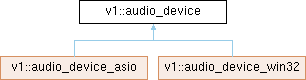
Public Member Functions | |
| std::string const & | id () const noexcept |
| The nonephemeral unique id that for an audio device on the system. | |
| std::string | name () const noexcept |
| Get a user friendly name of the audio device. | |
| virtual label | label () const noexcept=0 |
| Get a user friendly label of the audio device. | |
| virtual void | update_state () noexcept=0 |
| Update the internal state based on the audio device. | |
| virtual audio_device_state | state () const noexcept=0 |
| Get the current state of the audio device. | |
| virtual audio_direction | direction () const noexcept=0 |
| virtual bool | exclusive () const noexcept=0 |
| Check if the device is in exclusive mode. | |
| virtual void | set_exclusive (bool exclusive) noexcept=0 |
| Set the device in exclusive or shared mode. | |
| virtual double | sample_rate () const noexcept=0 |
| Get the currently configured sample rate. | |
| virtual void | set_sample_rate (double sample_rate) noexcept=0 |
| Set the sample rate. | |
| virtual hi::speaker_mapping | input_speaker_mapping () const noexcept=0 |
| Get the currently configured input speaker mapping. | |
| virtual void | set_input_speaker_mapping (hi::speaker_mapping speaker_mapping) noexcept=0 |
| Set the input speaker mapping. | |
| virtual std::vector< hi::speaker_mapping > | available_input_speaker_mappings () const noexcept=0 |
| Speaker mapping that are available in the current configuration. | |
| virtual hi::speaker_mapping | output_speaker_mapping () const noexcept=0 |
| Get the currently configured output speaker mapping. | |
| virtual void | set_output_speaker_mapping (hi::speaker_mapping speaker_mapping) noexcept=0 |
| Set the output speaker mapping. | |
| virtual std::vector< hi::speaker_mapping > | available_output_speaker_mappings () const noexcept=0 |
| Speaker mapping that are available in the current configuration. | |
Detailed Description
A set of audio channels which can be rendered and/or captures at the same time.
On win32 this would be Audio Endpoint gfx_device, which can either render or capture but not at the same time.
On MacOS this would contain all the inputs and outputs of either a physical or aggregate device that can run in the same clock domain, with both render and capture at the same time.
Member Function Documentation
◆ available_input_speaker_mappings()
|
pure virtualnoexcept |
Speaker mapping that are available in the current configuration.
- Returns
- A list of speaker mappings.
◆ available_output_speaker_mappings()
|
pure virtualnoexcept |
Speaker mapping that are available in the current configuration.
- Returns
- A list of speaker mappings.
◆ exclusive()
Check if the device is in exclusive mode.
- Returns
- True to if exclusive mode, False if shared mode
◆ id()
|
inlinenoexcept |
The nonephemeral unique id that for an audio device on the system.
◆ input_speaker_mapping()
|
pure virtualnoexcept |
Get the currently configured input speaker mapping.
- Returns
- The current configured input speaker mapping.
◆ label()
Get a user friendly label of the audio device.
This is a combination of the name of the device and the name of the end-point, plus an icon for the driver architecture.
◆ name()
|
inlinenoexcept |
Get a user friendly name of the audio device.
This is a combination of the name of the device and the name of the end-point.
◆ output_speaker_mapping()
|
pure virtualnoexcept |
Get the currently configured output speaker mapping.
- Returns
- The current configured output speaker mapping.
◆ sample_rate()
Get the currently configured sample rate.
- Returns
- The current sample rate, or 0.0f when the sample rate is not configured.
◆ set_exclusive()
Set the device in exclusive or shared mode.
In shared mode:
- The sample rate is the same as the operating system's mixer.
- The speaker mapping is the same as the operating system's mixer.
In exclusive mode:
- The sample rate can be changed, and the physical audio device will be configured to it.
- The speaker mapping can be changed, and the physical device will configure its input and outputs accordingly.
- Parameters
-
exclusive True to get exclusive mode, False to get shared mode.
◆ set_input_speaker_mapping()
|
pure virtualnoexcept |
Set the input speaker mapping.
- Parameters
-
speaker_mapping The input speaker mapping to configure the device to.
◆ set_output_speaker_mapping()
|
pure virtualnoexcept |
Set the output speaker mapping.
- Parameters
-
speaker_mapping The output speaker mapping to configure the device to.
◆ set_sample_rate()
Set the sample rate.
- Parameters
-
sample_rate The sample rate to configure the device to.
◆ state()
|
pure virtualnoexcept |
Get the current state of the audio device.
◆ update_state()
Update the internal state based on the audio device.
This function is called by the audio-system when a device change was detected.
The documentation for this class was generated from the following file:
- hikogui/src/hikogui/audio/audio_device.hpp