#include <hikogui/widgets/toolbar_tab_button_widget.hpp>
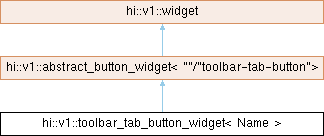
Public Types | |
| using | super = abstract_button_widget<Name / "toolbar-tab-button"> |
| using | delegate_type = typename super::delegate_type |
 Public Types inherited from hi::v1::abstract_button_widget< Prefix > Public Types inherited from hi::v1::abstract_button_widget< Prefix > | |
| using | super = widget |
| using | delegate_type = button_delegate |
| Public Types inherited from hi::v1::widget | |
| using | callback_token = notifier<void()>::callback_token |
| using | awaiter_type = notifier<void()>::awaiter_type |
Public Member Functions | |
| toolbar_tab_button_widget (widget *parent, std::shared_ptr< delegate_type > delegate, button_widget_attribute auto &&...attributes) noexcept | |
| Construct a toolbar tab button widget. | |
| template<different_from< std::shared_ptr< delegate_type > > Value, forward_of< observer< observer_decay_t< Value > > > OnValue, button_widget_attribute... Attributes> requires requires { make_default_radio_button_delegate(hi_forward(value), hi_forward(on_value)); } | |
| toolbar_tab_button_widget (widget *parent, Value &&value, OnValue &&on_value, Attributes &&...attributes) noexcept | |
| Construct a toolbar tab button widget with a default button delegate. | |
| void | request_redraw () const noexcept override |
| Request the widget to be redrawn on the next frame. | |
| Public Member Functions inherited from hi::v1::abstract_button_widget< Prefix > | |
| abstract_button_widget (widget *parent, std::shared_ptr< delegate_type > delegate) noexcept | |
| Public Member Functions inherited from hi::v1::widget | |
| widget (widget *parent) noexcept | |
| widget (widget const &)=delete | |
| widget (widget &&)=delete | |
| widget & | operator= (widget &&)=delete |
| widget & | operator= (widget const &)=delete |
| generator< widget & > | children (bool include_invisible) noexcept |
| virtual hitbox | hitbox_test_from_parent (point2i position) const noexcept |
| Call hitbox_test from a parent widget. | |
| virtual hitbox | hitbox_test_from_parent (point2i position, hitbox sibling_hitbox) const noexcept |
| Call hitbox_test from a parent widget. | |
| void | reset_layout (gfx_surface *new_surface, float new_scale) noexcept |
| Reset the layout. | |
| virtual sub_theme_selector_type | sub_theme_selector () const noexcept |
| virtual bool | process_event (gui_event const &event) const noexcept |
| virtual bool | handle_event_recursive (gui_event const &event, std::vector< widget_id > const &reject_list=std::vector< widget_id >{}) noexcept |
| Handle command recursive. | |
| virtual widget_id | find_next_widget (widget_id current_keyboard_widget, keyboard_focus_group group, keyboard_focus_direction direction) const noexcept |
| Find the next widget that handles keyboard focus. | |
| widget_id | find_first_widget (keyboard_focus_group group) const noexcept |
| widget_id | find_last_widget (keyboard_focus_group group) const noexcept |
| bool | is_first (keyboard_focus_group group) const noexcept |
| bool | is_last (keyboard_focus_group group) const noexcept |
| virtual void | scroll_to_show (hi::aarectanglei rectangle) noexcept |
| Scroll to show the given rectangle on the window. | |
| std::vector< widget_id > | parent_chain () const noexcept |
| Get a list of parents of a given widget. | |
| template<forward_of< void()> Callback> | |
| callback_token | subscribe (Callback &&callback, callback_flags flags=callback_flags::synchronous) const noexcept |
| awaiter_type | operator co_await () const noexcept |
Additional Inherited Members | |
| Data Fields inherited from hi::v1::abstract_button_widget< Prefix > | |
| std::shared_ptr< delegate_type > | delegate |
| The delegate that controls the button widget. | |
| observer< label > | on_label = tr("on") |
| The label to show when the button is in the 'on' state. | |
| observer< label > | off_label = tr("off") |
| The label to show when the button is in the 'off' state. | |
| observer< label > | other_label = tr("other") |
| The label to show when the button is in the 'other' state. | |
| observer< hi::alignment > | alignment |
| The alignment of the button and on/off/other label. | |
| Data Fields inherited from hi::v1::widget | |
| widget_id | id = {} |
| The numeric identifier of a widget. | |
| widget * | parent = nullptr |
| Pointer to the parent widget. | |
| gfx_surface * | surface = nullptr |
| The surface this widget is drawn on. | |
| observer< widget_mode > | mode = widget_mode::enabled |
| The widget mode. | |
| observer< bool > | hover = false |
| Mouse cursor is hovering over the widget. | |
| observer< bool > | clicked = false |
| The widget is being clicked by the mouse. | |
| observer< bool > | focus = false |
| The widget has keyboard focus. | |
| observer< widget_state > | state = widget_state::off |
| The state of the widget. | |
| size_t | semantic_layer = 0_uz |
| The draw layer of the widget. | |
| observer< extent2i > | minimum = extent2i{} |
| The minimum size this widget is allowed to be. | |
| observer< extent2i > | maximum = extent2i::large() |
| The maximum size this widget is allowed to be. | |
| widget_layout | layout |
| Static Public Attributes inherited from hi::v1::abstract_button_widget< Prefix > | |
| static constexpr auto | prefix = Prefix |
Detailed Description
class hi::v1::toolbar_tab_button_widget< Name >
A graphical control element that allows the user to choose only one of a predefined set of mutually exclusive views of a tab_widget.
A toolbar tab button generally controls a tab_widget, to show one of its child widgets.
A toolbar tab button has two different states with different visual representation:
- on: The toolbar tab button shows raised among the other tabs.
- other: The toolbar tab button is at equal height to other tabs.

Each time a user activates the toolbar tab button it switches its state to 'on'.
A toolbar tab button cannot itself switch state to 'other', this state may be caused by external factors. The canonical example is another toolbar tab button in a set, which is configured with a different on_value.
In the following example we create three toolbar tab button widgets on the window which observes the same value. Each tab button is configured with a different on_value: 0, 1 and 2.
- Note
- A toolbar tab button does not directly control a
tab_widget. Likeradio_button_widgetthis is accomplished by sharing a delegate or a observer between the toolbar tab button and the tab widget.
Constructor & Destructor Documentation
◆ toolbar_tab_button_widget() [1/2]
|
inlinenoexcept |
Construct a toolbar tab button widget.
- Parameters
-
parent The parent widget that owns this radio button widget. delegate The delegate to use to manage the state of the tab button widget. attributes Different attributes used to configure the label's on the toolbar tab button: a label,alignmentortext_theme. If one label is passed it will be shown in all states. If two labels are passed the first label is shown in on-state and the second for off-state.
◆ toolbar_tab_button_widget() [2/2]
requires requires { make_default_radio_button_delegate(hi_forward(value), hi_forward(on_value)); }
|
inlinenoexcept |
Construct a toolbar tab button widget with a default button delegate.
- Parameters
-
parent The parent widget that owns this toolbar tab button widget. value The value or observervalue which represents the state of the toolbar tab button.on_value An optional on-value. This value is used to determine which value yields an 'on' state. attributes Different attributes used to configure the label's on the toolbar tab button: a label,alignmentortext_theme. If one label is passed it will be shown in all states. If two labels are passed the first label is shown in on-state and the second for off-state.
Member Function Documentation
◆ request_redraw()
|
inlineoverridevirtualnoexcept |
Request the widget to be redrawn on the next frame.
Reimplemented from hi::v1::widget.
The documentation for this class was generated from the following file:
- hikogui/src/hikogui/widgets/toolbar_tab_button_widget.hpp